Knowing how to log in to your Orbi router is important if you want to customize your home network. Whether you are trying to improve your network security or optimize your Wi-Fi, knowing how to log in to your Orbi router is important.
This article will guide you through the Orbi router login process step-by-step. As a result, you should be able to manage your home network quickly and easily.
Why Should You Know The Orbi Router Login Steps?
Knowing how to access your Orbi router settings makes it easy to take control of your home network.
- You can change your Wi-Fi password to keep your network secure.
- You can rename your network, set up guest Wi-Fi, and manage connected devices.
- Regulate internet usage and access for family members.
- Keep your router firmware updated.
What Is The Orbi Router Login URL And IP?
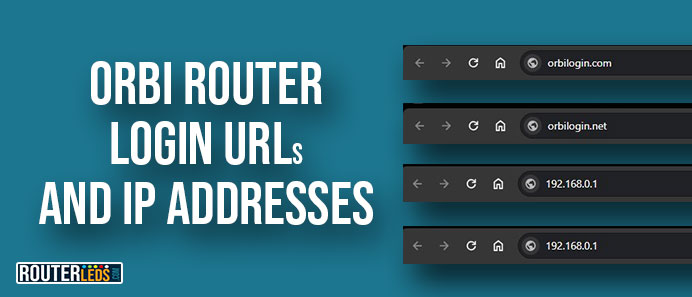
To access your Orbi router settings, you will need the login URL or IP address. Typically, you can use either of the following:
- Orbi Login URL: http://orbilogin.com or http://orbilogin.net
- Orbi IP Address: 192.168.1.1 or 10.0.0.1
You can also find the Orbi router IP on your own either from the Command Prompt on Windows or in the WiFi settings on your Android phone or iPhone.
How Do I Log Into My Orbi Router?
The steps explained in the next few paragraphs will walk you through each step, making sure the login is successful.
Step 1: Connect to Your Orbi Network
In order to access the Orbi router settings, your device must be connected to the Orbi network. You can do this either wirelessly or through a wired Ethernet connection.
To connect Wirelessly, select the Orbi network from your computer or smartphone Wi-Fi settings and enter the password.
To connect using a Wired connection, connect an Ethernet cable from your device to one of the Orbi router LAN ports.
Step 2: Open A Web Browser
You can use any web browser like Chrome, Firefox, Safari, or Edge. Make sure your browser is up to date to avoid compatibility issues.
Click on the browser icon on your device.
NOTE: Before entering your IP and admin login details, check the Orbi router LED lights. A solid white or blue light indicates a normal operating state, which is ideal for logging in. If the lights show a different color, like purple or red, it might indicate a connection issue.
Step 3: Enter The Login URL or IP Address
The Orbi router can be accessed through a standard Orbi login URL or its default IP address. Both lead to the same login screen.
- Orbi Login URL: Type http://orbilogin.com or http://orbilogin.net in the address bar.
- Orbi router IP Address: Alternatively, use 192.168.1.1 or 10.0.0.1.
Step 4: Enter The Admin Login Details
This step is important as it prevents unauthorized access to your router settings.
Orbi Default Login Details
- Username: Typically, the default username is “admin“.
- Password: The default password is often “password“. (Check your Orbi router manual or the sticker on the router if these don’t work.)
Step 5: Access The Admin Panel
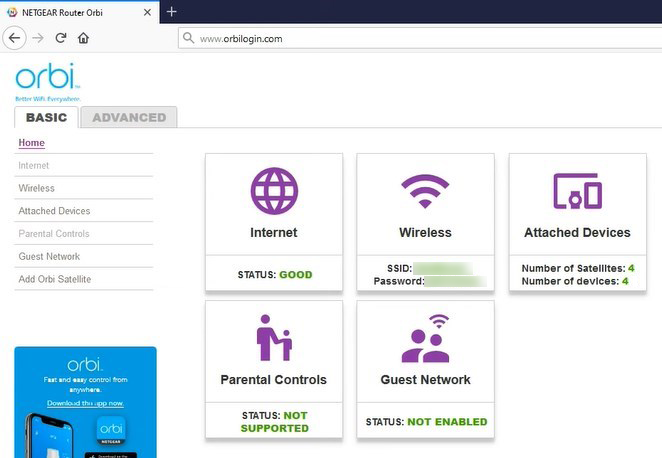
After you login successfully, you will see the Orbi admin dashboard. Here, you can customize settings like Wi-Fi name, password, network security, parental controls, and more.
NOTE: Be cautious when changing settings.
Troubleshooting: Orbi Web Login Not Working
If you are having issues accessing the Orbi router login page, here are some tried and tested solutions to help you identify and fix the issue.
Step 1: Check Your Network Connection
A stable connection to your Orbi network is crucial for accessing the router’s settings.
- First of all, make sure your device is connected to the Orbi network, either wirelessly or via Ethernet.
- Check the Orbi router LED light for any network errors or warnings in your device settings.
Step 2: Confirm the URL/IP Address
Entering the wrong URL or IP address is a frequent error that can prevent access to the login page.
Correct Addresses
- Orbi Login URL: Recheck that you have entered http://orbilogin.com correctly. Try the other login URL as well: orbilogin.net.
- Orbi Login IP Address: Alternatively, use
192.168.1.1or 10.0.0.1 and make sure there are no typos.
Step 3: Troubleshoot Browser Issues
Browser-related problems like cache or compatibility issues can stop you from accessing the login page.
- Try a different web browser.
- Clear your current browser’s cache and cookies.
- Disable any browser extensions that might interfere with the router login page.
Step 4: Check The Orbi Router And Modem
Router or modem hardware issues can affect your network connectivity.
- Check that the Orbi router and modem are powered on and functioning.
- Check and reconnect all cable connections.
- Observe the Orbi router LED lights for any unusual indicators.
Step 5: Factory Reset The Orbi Router
A factory reset should be your last option if all other troubleshooting steps fail.
In order to reset the Orbi router to factory default settings, follow these steps:
- Find the reset button on your Orbi router.
- Use a paperclip or something similar to press and hold the reset button for about 10 seconds.
- Release the button and wait for the router to reboot.
NOTE: This will erase all custom settings and you need to set up your router again.
Frequently Asked Questions
In case you have forgotten your Orbi router login password, you can reset it to the default by performing a factory reset.
Yes, after you login to your Orbi router admin dashboard, go to the Wi-Fi settings to change your network’s name (SSID) and password. This will help you personalize and secure your network.
To update your Orbi router firmware, log in to the router first. Then go to the “Advanced” tab, and select “Administration”. Check the “Firmware Update” option and follow the on-screen instructions.
If you can’t access orbilogin.com, check your connection to the Orbi network. If the issue remains, try using the Orbi router IP address (192.168.1.1 or 10.0.0.1) instead.
Yes, Orbi routers allow you to set up parental controls. After you log in, check the parental control settings where you can manage access and restrictions for devices on your network.
For an optimized gaming or streaming experience, log into your Orbi router and adjust the Quality of Service (QoS) settings. This will make sure gaming or streaming traffic has greater priority.
Yes. Orbi routers are designed to support multiple device connections. Just make sure each device is within the router range and has the correct Wi-Fi password.
For slow internet speeds, try rebooting your Orbi router first. Check for any firmware updates and make sure too many devices aren’t connected at the same time. This can slow down the entire network.
Conclusion
Logging into your Orbi router is the first step toward a healthy and secured home internet network. By following the steps presented in this article, you can easily manage and customize your network settings.
If you experience any issues, contact your ISP or Netgear Orbi support for assistance. Now go through the Orbi router login steps and explore the possibilities of your Orbi router settings.
